Zig is a modern systems programming language that acts as a compelling alternative to C, providing native C interop and stronger type safety. Learn how to build Zig applications for the Web and make them future-proof.
Recap
In the previous blog, we covered the basics of Zig, what WASM is, and the project we are building. We are creating a simple 2-channel WAV audio visualizer. The application takes a WAV file and displays the waveforms, similar to this:
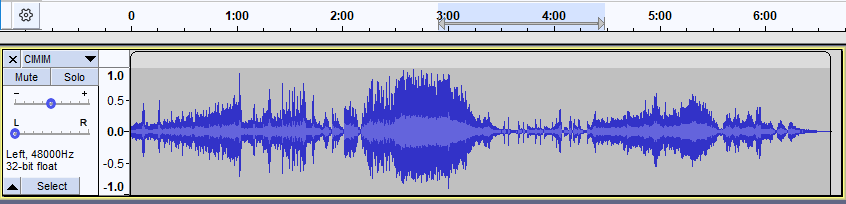
(The image above represents a single channel.)
WAV File Format
Let's revisit the WAV file format. The data inside a WAV file is structured as follows:

A quick look tells us that after the first 44 bytes (the Header), we have the actual audio data. The size of this data is stored in the Subchunk2Size field of the Header.
A WAV file can exist in multiple variants (e.g., 1 or 2 channels, 44.1 kHz or 48 kHz). For simplicity, we will focus on the PCM format, a standard for WAV files. This means the AudioFormat header field will have a value of 1.
The audio will have a 16-bit depth, meaning individual samples can have a maximum of 216 = 65,536 unique values.
Why does 16-bit depth imply 65,536 values? If a data type is represented as a sequence of n bits, the total number of unique values it can represent is 2n. This is why ASCII encoding (7 bits) can store up to 128 unique symbols.
In audio processing, we split this range in half: lowest = -32,768 and highest = +32,767. Negative values represent the downward displacement of particles in the medium. If we only used positive values, we would lose information about direction. While mathematically similar, using signed values mimics the physical world.
For a more in-depth look at WAV, check this guide.
Coding the Parser
From the file format above, we know there is a strict order to how data inside a WAV is stored. A program that analyzes information following a specific rule is called a Parser.
Our parser is surprisingly easy. At the end of the day, it's just a contiguous sequence of binary data. The pseudo-code looks like this:
Verify() <- WAV // verify if the file is a valid WAV
readNumberOfSamples() <- WAV // read the total number of samples from the header
readLeftAudio() <- // read the audio data for the left channel
readRightAudio() <- // read the audio data for the right channel
readNumberOfSamples in C would look like this:
// C
int readNumberOfSamples(uint8_t * data) {
    int a = data[40];
    int b = data[41];
    int c = data[42];
    int d = data[43];

    // Combine 4 bytes into one integer (Little Endian)
    int sampleSize = a | (b << 8) | (c << 16) | (d << 24);

    int numberOfSamples = sampleSize / 4;
    return numberOfSamples;
}
The Subchunk2Size part of the header tells us how big the audio data is. If we don't have this number, our program won't know when to stop reading.
Metadata We also need
Subchunk2Sizeto handle metadata. If you want to add the artist's name, you can't put it in the standard header. Instead, you place it after the audio data.Subchunk2Sizetells us exactly how many bytes are audio; anything after that is metadata.
We calculate the number of samples by dividing the total size by 4. Why 4? Because in our PCM format, each sample consists of 4 bytes (2 bytes for Left Channel + 2 bytes for Right Channel).
Let's convert the C code to Zig:
// Zig
export fn returnSamples(data: [*]const u8) i32 {
    // We cast to usize or u32 to prevent overflow during shifting
    const val1: u32 = @intCast(data[40]);
    const val2: u32 = @intCast(data[41]);
    const val3: u32 = @intCast(data[42]);
    const val4: u32 = @intCast(data[43]);

    // Combine bytes using bitwise OR
    const subchunk2_size: u32 = val1 | (val2 << 8) | (val3 << 16) | (val4 << 24);

    // Cast back to signed integer if necessary for your logic
    const size_i32: i32 = @intCast(subchunk2_size);

    // We use @divFloor for explicit integer division behavior
    return @divFloor(size_i32, 4);
}
This looks similar to C, but with Zig's safety features:
data: [*]const u8: This is a "many-item pointer" to constant unsigned bytes.@intCast: A built-in function to convert between integer types.@divFloor: Zig requires explicit division operators to avoid ambiguity (truncation vs. floor).export: Necessary when targeting WASM to make the function callable from the host (JavaScript).
Now, let's extract the audio samples.
Note on Memory: In the C example, we might just return a pointer. In Zig/WASM, returning a pointer to a variable created inside the function (stack memory) is a bug—the memory is freed when the function returns. To keep it simple, we will use a global array (static memory) to store our results.
// Global buffer to store extracted samples
var output_buffer = [_]i32{0} ** 65536;

export fn returnLeftSection(data: [*]const u8, data_len: usize) [*]i32 {
    // 1. Calculate number of samples
    const val1: u32 = @intCast(data[40]);
    const val2: u32 = @intCast(data[41]);
    const val3: u32 = @intCast(data[42]);
    const val4: u32 = @intCast(data[43]);

    const subchunk2_size: u32 = val1 | (val2 << 8) | (val3 << 16) | (val4 << 24);
    const samples = subchunk2_size / 4;

    // 2. Iterate and extract Left Channel
    var cursor: usize = 44; // Start after header
    var array_idx: usize = 0;

    // Ensure we don't read past the file or overflow our output buffer
    while (cursor + 4 <= data_len and array_idx < output_buffer.len) {
        // Read 2 bytes for the left channel (Little Endian)
        const byte1: u16 = @intCast(data[cursor]);
        const byte2: u16 = @intCast(data[cursor + 1]);

        // Combine into a 16-bit value
        // We accept wrap-around arithmetic with -% or cast carefully
        const raw_val: u16 = byte1 | (byte2 << 8);

        // Convert the raw u16 bits into a signed i16 representation
        const signed_val: i16 = @bitCast(raw_val);

        output_buffer[array_idx] = signed_val;

        array_idx += 1;
        cursor += 4; // Skip 4 bytes (2 for Left, 2 for Right)
    }

    // Return pointer to our global buffer
    return @ptrCast(&output_buffer);
}
Let's break down the changes:
- Global Buffer: We use
output_bufferoutside the function so the data persists after the function returns. - Bit Casting: We combine the two bytes into a
u16first, then use@bitCastto interpret those bits as a signedi16. This correctly handles negative audio values. - Cursor Logic: We increment
cursorby 4 in every loop to skip the Right channel bytes and move to the next sample.
Wrapping Up
Great job making it this far!
In this chapter, we dove into the WAV format and built a parser for it in Zig. In the next post, we will incorporate what we've built into the WASM target and bootstrap it with some HTML and CSS.